Skip to content

You have fifteen SKUs. Five product types, three colour variants each. Some ship to the US, some to the EU, some to both. The US versions need a Prop 65 warning. The EU versions need a CE mark and an EU responsible person address. Two products got new barcodes last quarter when you switched distributors. One product had its product name changed in a rebranding. And your factory is currently printing packaging for three different SKUs simultaneously — using art files that may or may not be the most recent version.
If any of those files is a previous version, something on the final packaging will be wrong. And you will not know it until the goods arrive — with the wrong barcode, the wrong language, the outdated product name, or the missing compliance language.
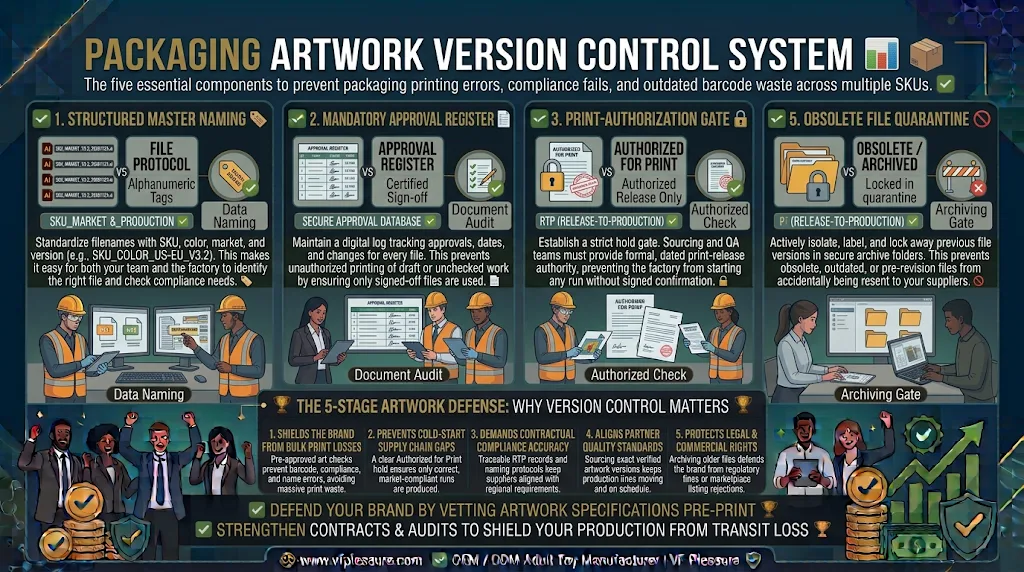
Managing packaging artwork across multiple private label sex toy SKUs requires a version control system with five components: a master file naming convention that embeds SKU, market, and version number into every artwork filename, an approval register that records who approved each version and when, a print-authorisation gate that stops any factory from printing against a file that has not been approved in the current version, a release-to-production record that marks which file version is active for each SKU, and an obsolete file quarantine that prevents superseded artwork files from ever reaching the factory again.1
I'm Sally. I run VF Pleasure — a direct adult toys factory in Dongguan, China, with 15+ years of B2B manufacturing experience. We provide private label services including custom packaging, logos, and colours tailored to each client's brand and market preferences. At VF Pleasure, our team handles packaging artwork for clients across global markets — and we have seen every category of artwork error that multi-SKU brands experience, from wrong-language user manuals to outdated compliance marks on a reorder that the brand thought matched the previous run.
This guide covers the full artwork management system — file naming, approval workflow, production release, and what to do with obsolete files when artwork is updated.
- 1 Why Does Artwork Version Control Fail for Multi-SKU Private Label Brands?
- 2 The File Naming Convention: How to Build It and Why It Prevents Most Errors
- 3 The SKU-to-Market Mapping Table: Which File Applies Where?
- 4 The Artwork Approval Workflow: Who Can Approve, Who Can Release?
- 5 The Print-Authorisation Gate: How to Prevent Printing Before Approval
- 6 Handling Artwork Revisions: When a Compliance Update Requires a New Version
- 7 The Artwork Approval Register: The Written Audit Trail
- 8 Conclusion
- 9 References & Source Notes
Why Does Artwork Version Control Fail for Multi-SKU Private Label Brands?
Single-SKU brands rarely have artwork management problems. The file exists, it was approved, it is used. For multi-SKU brands selling into multiple markets, the same file management approach creates compounding risk — because every variable that changes on one SKU (new barcode, new compliance language, new product name) creates the possibility of that change appearing on the wrong file, or the old version being used on a reorder.
Artwork version control fails for multi-SKU private label brands for three structural reasons: the same product ships into markets with different legal requirements (meaning each market needs a distinct artwork file), colour and name variants create visual similarity between different SKU files that makes the wrong file easy to send by mistake, and reorders months after the original run may use artwork that has been superseded by a compliance update that happened between the two production runs.1
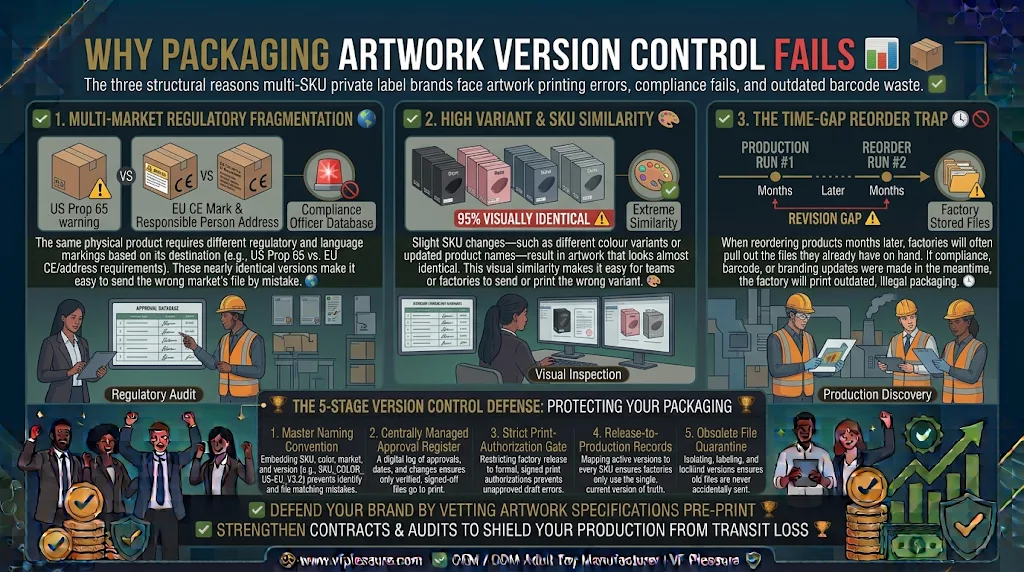
Here is each failure mode — with the specific error it produces at the factory.
⚠️ Failure Mode 1 — Market-Specific Files Used for the Wrong Market
Your US product requires a Prop 65 warning. Your EU product requires a CE mark and EU responsible person address. If a reorder for the EU market is placed and your factory receives the US-version file — which is visually almost identical to the EU version — they will print the US version without the CE mark and EU importer address.
The goods arrive. They have the wrong compliance language. They cannot be listed on EU platforms without the CE mark. They cannot be shipped to EU distribution without the EU importer address. The packaging is scrap.
Prevention: File naming that embeds the market code makes it impossible to send the US version to an EU production run without catching the error — but only if the naming convention is applied consistently and every file handed to the factory includes the market code.
⚠️ Failure Mode 2 — Visual Similarity Between Variants
Your vibrator comes in pink, purple, and black. The packaging for each colour is 95% identical — only the product photography and the colour name text are different. If a team member emails your factory for a reorder of the black variant and attaches the purple variant file by mistake, the factory prints purple-on-black packaging. Nobody catches it until the goods arrive because nobody checked the file version at the time of sending.
Prevention: A file naming convention that includes the variant code, combined with an approval gate that requires the sender to confirm the file version before the factory is authorised to print, makes this error visible before it reaches the press.
⚠️ Failure Mode 3 — Reorder Against Superseded Artwork
Your Prop 65 warning text was updated six months ago — California's updated phrasing requirement. Your team updated the US-market files at the time. But when a reorder was placed three months later, the person handling the order found the artwork file in email history and sent the old version — the one with the old Prop 65 language — to the factory. The factory printed it. Nobody caught it.
Prevention: A release register that records the current approved version for each SKU and market, combined with a quarantine for obsolete files, means no one can accidentally send a superseded file — because the superseded file is not accessible in the active file library.
Our private label adult products development process guide, wholesale private label adult products guide 2025, and 5 tips to build an affordable private label sex toys project guide all cover the operational side of private label packaging — this guide covers the version control layer specifically.
The File Naming Convention: How to Build It and Why It Prevents Most Errors
A file naming convention is the cheapest and most effective single component of an artwork version control system. It costs nothing to implement and prevents the majority of wrong-file errors — because a file with the right name is impossible to confuse with a file for a different SKU or market.
A private label sex toy artwork file naming convention must embed five data elements in every filename: the buyer SKU code, the market code (US/EU/UK/AU or combined), the variant code if applicable (colour or size), the artwork version number, and the approval status indicator (DRAFT, APPROVED, RELEASED, OBSOLETE). A file without all five elements visible in its name should not be accepted by the factory for production.2
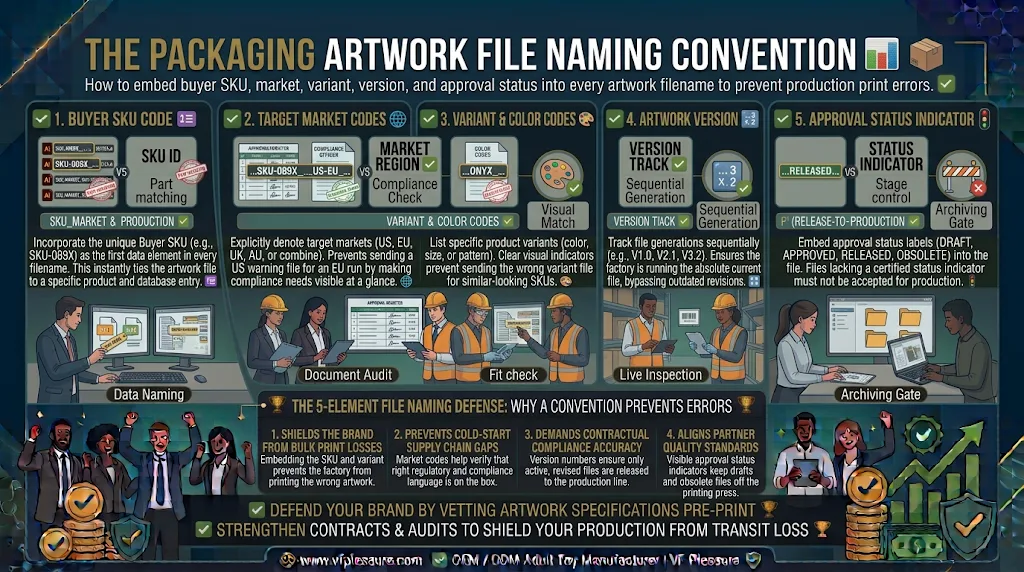
Here is the naming convention structure — with examples for each element.
📁 The Five-Element Filename Structure
Format:
[BUYER-SKU]_[MARKET]_[VARIANT]_v[VERSION]_[STATUS].ai
Example file names:
| Filename | Meaning |
|---|---|
BR-VIB-001_US_PNK_v1_DRAFT.ai | SKU BR-VIB-001, US market, pink variant, version 1, draft |
BR-VIB-001_US_PNK_v2_APPROVED.ai | Same SKU/market/variant, version 2 after first revision, approved for print |
BR-VIB-001_EU_PNK_v2_RELEASED.ai | EU market version, same variant, same version, released to factory |
BR-VIB-001_US_PNK_v1_OBSOLETE.ai | Version 1 of the US pink file, superseded and quarantined |
BR-STR-003_UK_BLK_v1_RELEASED.ai | Stroker model 003, UK market, black variant, version 1, released |
📋 Element Definitions
Buyer SKU Code: Your internal product code. Must match the SKU in your purchase orders and inventory system exactly. No abbreviations that could match multiple SKUs.
Market Code: The destination market for which this file has been configured. Use standard codes:
- US = United States (requires Prop 65 warning)
- EU = European Union (requires CE mark, EU responsible person address)
- UK = United Kingdom (requires UKCA mark post-Brexit)
- AU = Australia
- GLB = Global version if no market-specific compliance language
Variant Code: Colour, size, or configuration variant. Keep codes short and unambiguous:
- PNK = pink
- PRP = purple
- BLK = black
- RED = red
- Use product dimensions or size descriptor for size variants
Version Number: Sequential version number. Start at v1 for the first draft submitted to the factory. Increment by 1 for every revision. Never overwrite a previous version — create a new version file and update the old one to OBSOLETE status.
Status: Four status values:
- DRAFT — artwork created, not yet approved for production
- APPROVED — approved by the brand's authorised approver, may be used for a print proof
- RELEASED — released to factory for bulk production
- OBSOLETE — superseded by a newer version; must be quarantined
💡 Sally's naming convention note: At VF Pleasure, we ask our multi-SKU private label clients to include the status indicator in the filename before sending us any file. It eliminates the most common packaging error we see — a client sending us a file they thought was the current version, which turns out to be a draft from two revisions ago. When a file arrives without a status indicator in the filename, our team flags it before proceeding.
The SKU-to-Market Mapping Table: Which File Applies Where?
Before the naming convention can protect you, you need to know which file applies to which SKU in which market. For a brand with five SKUs shipping to three markets, that is potentially fifteen distinct files. For a brand with fifteen SKUs and four colour variants each across three markets, that is potentially one hundred and eighty files.
A SKU-to-market mapping table is a master reference document that records the active approved artwork file for every combination of product SKU, colour variant, and destination market. It is the single source of truth for which file the factory should use for any given production run — and it must be updated every time a new artwork version is approved.3
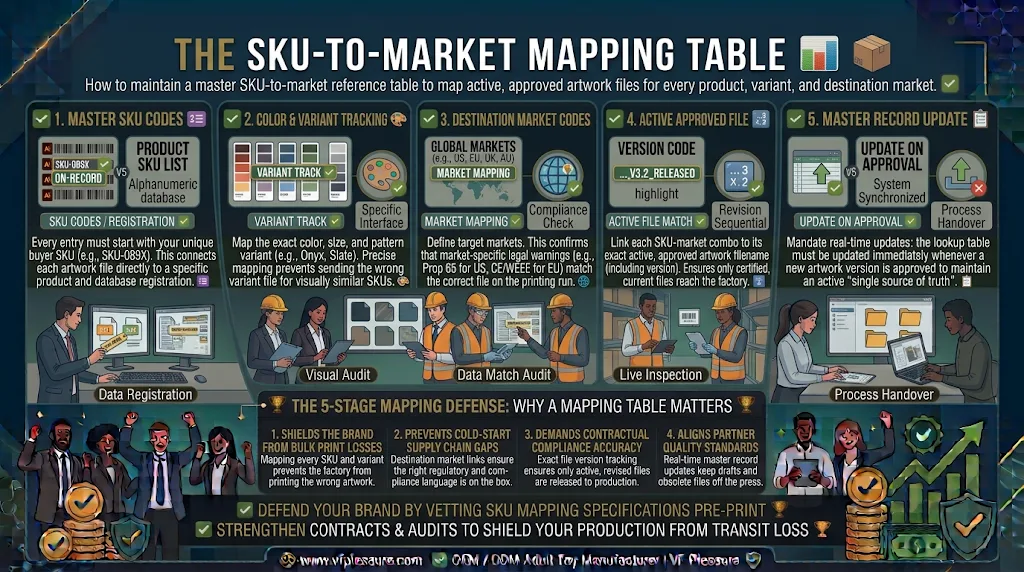
Here is the mapping table structure — ready to use.
📊 SKU-to-Market Mapping Table Template
| Buyer SKU | Product Name | Variant | Market | Active File Name | File Version | Last Updated | Approved By |
|---|---|---|---|---|---|---|---|
| BR-VIB-001 | Silken Touch Wand | Pink | US | BR-VIB-001_US_PNK_v2_RELEASED.ai | v2 | 2025-03-15 | [Approver name] |
| BR-VIB-001 | Silken Touch Wand | Pink | EU | BR-VIB-001_EU_PNK_v2_RELEASED.ai | v2 | 2025-03-15 | [Approver name] |
| BR-VIB-001 | Silken Touch Wand | Purple | US | BR-VIB-001_US_PRP_v1_RELEASED.ai | v1 | 2025-01-10 | [Approver name] |
| BR-VIB-001 | Silken Touch Wand | Purple | EU | BR-VIB-001_EU_PRP_v1_RELEASED.ai | v1 | 2025-01-10 | [Approver name] |
| BR-STR-003 | Compact Bullet | Black | US | BR-STR-003_US_BLK_v3_RELEASED.ai | v3 | 2025-06-01 | [Approver name] |
This table serves three functions:
- At order placement: The person placing the production order checks the table to find the active file name and version for the SKU and market being ordered
- At factory communication: The active filename is included in the purchase order or factory brief so the factory can confirm they have the right file before printing
- At audit: If a packaging error occurs, the table shows what file version should have been used and when it was last updated
The table should be stored in a shared location accessible to everyone involved in placing factory orders — your operations team, your purchasing manager, and your factory account manager. It should not live in anyone's personal email history.
The Artwork Approval Workflow: Who Can Approve, Who Can Release?
An approval workflow without named approvers is not a workflow. If anyone can approve an artwork file, the approval step provides no protection. The workflow must name specific people for specific approval steps — and must require different people for the design approval and the production release steps.
A private label sex toy artwork approval workflow requires three distinct roles: an artwork creator who produces the design file and is responsible for its technical accuracy, a named approver who reviews the file against the brand standards and compliance requirements checklist before marking it APPROVED, and a release authoriser who performs the final check against the SKU-to-market mapping table before marking the file RELEASED to factory. These three roles should never be the same person for the same file.4
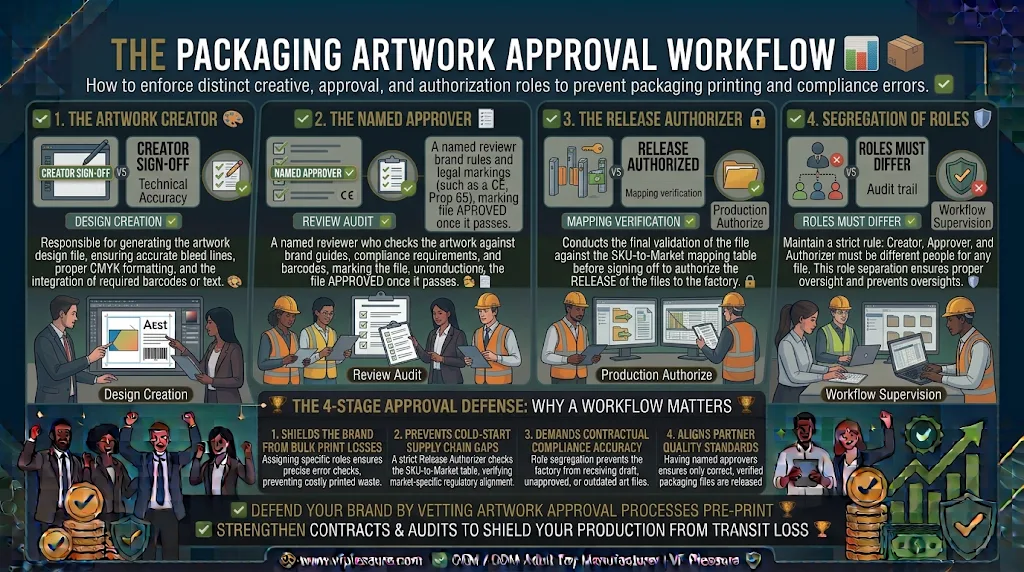
Here is each role — with their specific responsibilities and the checklist they sign off against.
👤 Role 1 — Artwork Creator
The artwork creator is responsible for the technical production of the design file. This may be your in-house designer, a freelance designer, or VF Pleasure's design team for clients using our packaging design service.
Creator's checklist before submitting for approval:
- ✅ All text is set at correct Pantone or CMYK values (no RGB values in a print file)
- ✅ All barcodes are scannable — tested in a barcode scanning app
- ✅ FNSKU barcode (if Amazon FBA) matches the product's ASIN
- ✅ Product name matches the purchase order and listing exactly
- ✅ Material claim reads "food-grade silicone" — not "medical-grade silicone" or vague "silicone"
- ✅ Country of origin is correct
- ✅ All required regulatory marks for the target market are present (CE, UKCA, RoHS, Prop 65 as applicable)
- ✅ Importer/responsible person address matches the market version
⚠️ Material claim reminder: VF Pleasure manufactures to food-grade silicone standards — the correct, honest, and verifiable claim for adult toy body-contact surfaces. Any packaging that reads "medical-grade silicone" is using a claim that adult toy manufacturers do not hold regulatory status for. Remove it. Replace it with "food-grade silicone."
Creator's output: The file is renamed with the DRAFT status indicator and submitted to the named approver.
👤 Role 2 — Named Approver
The named approver is a specific individual — typically a brand manager, product manager, or operations lead — who reviews the submitted draft against the compliance requirements and brand standards for that specific SKU and market.
Approver's checklist:
- ✅ File naming convention followed correctly (SKU, market, variant, version, status)
- ✅ All market-specific compliance language is present and correct for the file's market code
- ✅ Barcode number on file matches the barcode registration for this SKU
- ✅ Product name matches the current registered name (not an outdated name from a previous run)
- ✅ All regulatory marks are correct version and minimum size
- ✅ Importer/responsible person details match the current legal entity for this market
- ✅ Packaging type (matte, glossy, soft-touch) matches the production specification
If the file passes all checks, the approver renames it with the APPROVED status indicator and records the approval in the artwork approval register.
Approver's output: The file is renamed [SKU][MARKET][VARIANT]_v[N]_APPROVED.ai and an entry is made in the approval register.
👤 Role 3 — Release Authoriser
The release authoriser performs the final check before the file is transmitted to the factory. This is the last gate before the printing press. The release authoriser is a different person from the approver — their role is to verify the production context, not the design content.
Release authoriser's checklist:
- ✅ The file being released matches the active file in the SKU-to-market mapping table
- ✅ No other version of this file exists in the factory's active file folder (check that the previous version, if any, has been moved to the OBSOLETE folder)
- ✅ The purchase order being processed matches the market code in the filename
- ✅ The quantity on the production order does not span two markets (a single print run should be for one market version only — mixing market versions in a single print run is a compliance risk)
- ✅ The factory has confirmed receipt of the file by filename (with status indicator and version number)
Release authoriser's output: The file is renamed [SKU][MARKET][VARIANT]_v[N]_RELEASED.ai, the SKU-to-market mapping table is updated, the previous active version (if any) is moved to the OBSOLETE folder, and the factory is confirmed to have received the released file.
A print-authorisation gate is the specific point in the factory communication process where you confirm in writing that the factory is authorised to begin printing. Without this gate, a factory that receives an artwork file will treat the receipt of the file as an instruction to proceed — particularly if production is on a time-sensitive schedule.
A print-authorisation gate requires a written production release instruction that explicitly names the file version the factory is authorised to print, the quantity, the destination market, and a statement that no other artwork version for this SKU and market is authorised for this production run. The gate must be communicated by email — not in a messaging app — so a permanent searchable record exists.5
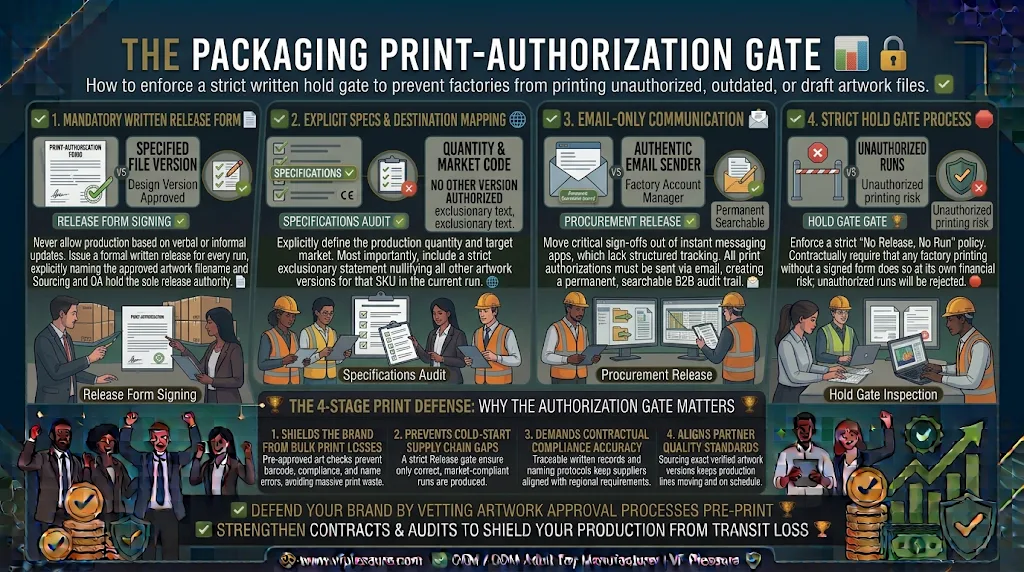
Here is the print-authorisation instruction template:
PRINT AUTHORISATION — PRODUCTION ORDER [PO NUMBER]
To: [Factory contact name and email]
From: [Your release authoriser name and email]
Date: [DATE]
You are authorised to proceed with packaging printing for the following production run:
- Product: [Product name and factory model number]
- Buyer SKU: [SKU CODE]
- Market: [US / EU / UK / AU]
- Colour/Variant: [Variant code]
- Quantity: [X units]
- Authorised Artwork File:
[BUYER-SKU]_[MARKET]_[VARIANT]_v[VERSION]_RELEASED.ai - File Version: [Version number]
- File Last Approved: [Date of approval]
No other artwork version for this SKU and market is authorised for this production run.
Before printing begins, please confirm receipt of the above file by filename and confirm the version number matches the file in your possession.
Request confirmation from the factory before printing begins. A factory confirmation that reads "confirmed receipt of [exact filename]" creates the documented evidence that the factory knew which file was authorised. If a packaging error occurs after this confirmation, the error is unambiguously attributable to the factory deviating from the authorised file.
Handling Artwork Revisions: When a Compliance Update Requires a New Version
Artwork revisions are unavoidable. Regulatory requirements change. Barcodes change when distributors change. Product names change with rebranding. Importer addresses change when you open a new European entity. Each change requires a new artwork version — and the old version must be moved to OBSOLETE status immediately, not left in the active file folder where it can be accidentally re-used.
When a compliance update or other change requires a new artwork version, the revision workflow follows five steps: create the new version file with the incremented version number, submit it through the full approval workflow (do not shortcut the approver or release authoriser steps even for minor changes), update the SKU-to-market mapping table with the new active version, quarantine the superseded version in the OBSOLETE folder, and notify your factory account manager that the previous version is no longer valid for future production runs.6
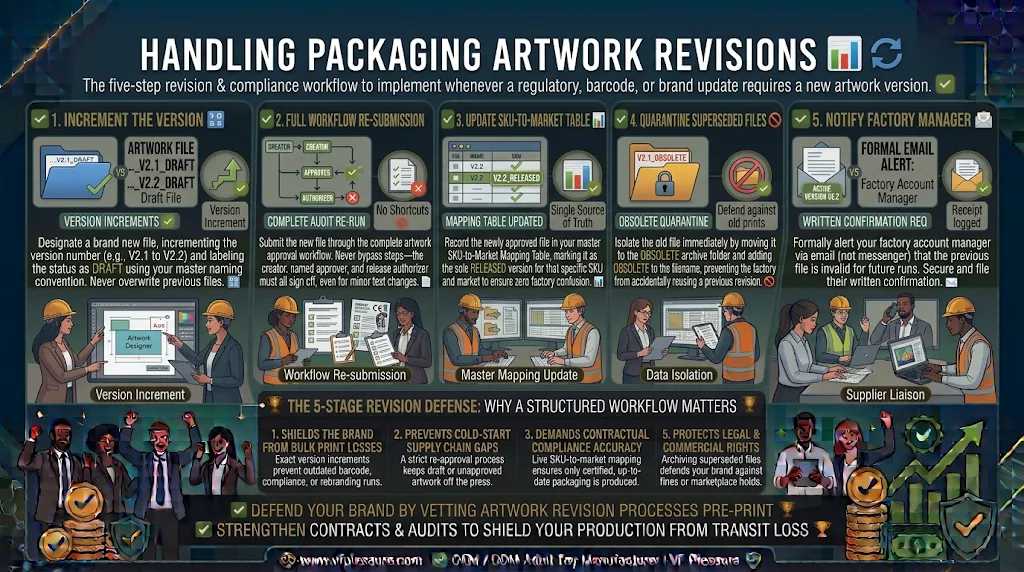
Here is each step in detail — with the specific action required and the documentation to create.
🔄 Revision Step 1 — Create New Version File
Create the revised artwork file and name it with the incremented version number and DRAFT status:
BR-VIB-001_EU_PNK_v3_DRAFT.ai
The old version — BR-VIB-001_EU_PNK_v2_RELEASED.ai — remains in its current location during the revision process. Do not rename it yet.
🔄 Revision Step 2 — Full Approval Workflow (No Shortcuts)
Even if the change is minor — a single word updated in the Prop 65 warning — the new version must go through the full approval workflow. Minor changes are the most likely to be approved without careful review. The approval workflow is not proportional to change severity — it is consistent for all changes.
The compliance requirements checklist in the approver's review must include an explicit check: "What changed from the previous version — is this change intentional and complete?"
🔄 Revision Step 3 — Update SKU-to-Market Mapping Table
Once the new version reaches RELEASED status, update the mapping table:
| Previous Active File | New Active File |
|---|---|
| BR-VIB-001_EU_PNK_v2_RELEASED.ai | BR-VIB-001_EU_PNK_v3_RELEASED.ai |
The mapping table now shows the new active version. Anyone placing a production order for this SKU and market will be directed to v3.
🔄 Revision Step 4 — Quarantine the Superseded File
Rename the previous active file:
BR-VIB-001_EU_PNK_v2_OBSOLETE.ai
Move it to your OBSOLETE folder — a separate location not shared with the factory and not in the working file folder. The OBSOLETE folder is an archive, not a bin. Keep the files — do not delete them. You may need them for a compliance audit or a defect claim reference.
Critical rule: The OBSOLETE folder must not be shared with the factory under any circumstances. If the factory has cloud storage access to your files, ensure the OBSOLETE folder is excluded from their access permissions.
🔄 Revision Step 5 — Notify Factory Account Manager
Send a written notification to your factory account manager:
"Please be advised that version 2 of the EU artwork for SKU BR-VIB-001 (Pink) is no longer valid for production. The active version for all future production runs of this SKU and market is version 3:
BR-VIB-001_EU_PNK_v3_RELEASED.ai. Please update your production files and confirm that version 2 has been retired from your active file storage."
Request a written confirmation from the factory. This notification and confirmation create the documented record that the factory was explicitly informed of the version change — which is your protection if they accidentally use the old version on a future reorder.
💡 Sally's note: At VF Pleasure, we maintain a production file folder for each active client, with one RELEASED artwork file per SKU/market combination. When a client sends a notification that a file has been superseded, our production team moves the old file to an archived folder and updates the active production file. The key is that this process only works if the client sends the notification explicitly — a factory cannot know that a file has been superseded unless you tell them. This notification step protects both parties.
The Artwork Approval Register: The Written Audit Trail
The approval register is the document that records every approval decision — who approved, what they approved, and when. It is not operational (operations use the mapping table). It is a compliance and audit record — the evidence that every piece of packaging your brand has shipped was reviewed and approved by a named person before it was printed.
The artwork approval register must record ten fields for every approval event: the buyer SKU, market code, variant code, version number, the nature of the change from the previous version (or "first version" for new files), the approver's name and job title, the approval date, the release authoriser's name, the release date, and the production order number against which the file was first used. This register is your compliance audit trail for packaging decisions.7
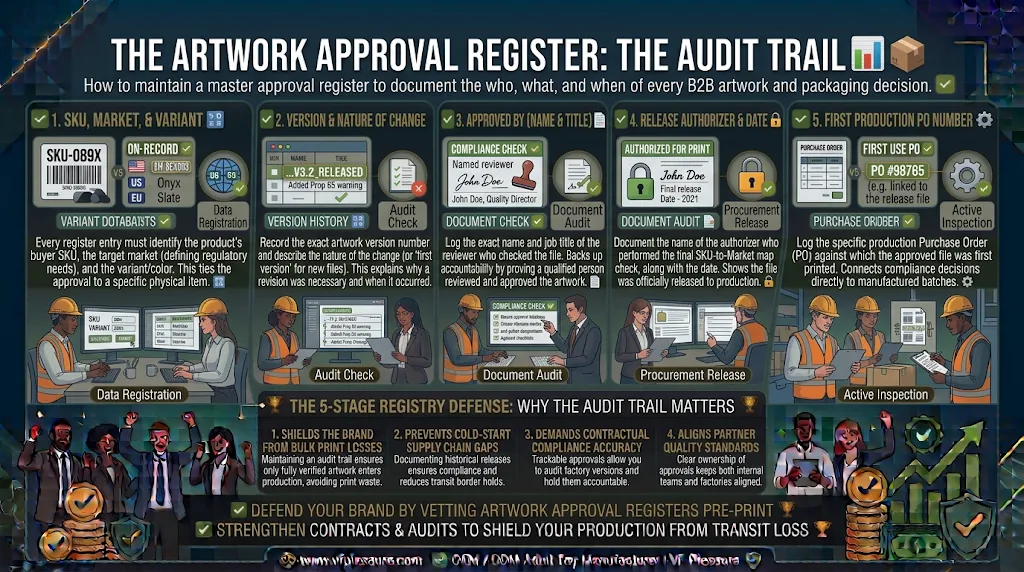
📋 Artwork Approval Register Entry Template
| Field | Entry |
|---|---|
| Buyer SKU | BR-VIB-001 |
| Market | EU |
| Variant | Pink (PNK) |
| Version Number | v3 |
| Nature of Change | Updated EU responsible person address; added GPSR-compliant contact reference |
| Approver Name | [Name] |
| Approver Role | Brand Manager |
| Approval Date | 2025-06-01 |
| Release Authoriser Name | [Name] |
| Release Date | 2025-06-03 |
| First Used on PO | PO-2025-047 |
A complete approval register — one entry per version per SKU/market combination — creates a complete history of every packaging version your brand has used. If a compliance query arises about a specific product shipment, you can trace the product's production order to the artwork version used, the approver who signed off, and the nature of any changes from the previous version.
Our 5 contract clauses OEM sex toy supplier guide, private label sex toys business guide, and adult toy quality compliance guide all address the compliance and documentation framework around private label production — this approval register is the packaging-specific layer of that broader compliance documentation system.
Conclusion
Artwork version control across multiple private label sex toy SKUs is a data management and process discipline problem — not a design problem. A consistent file naming convention, a SKU-to-market mapping table, a named approval workflow with three distinct roles, a print-authorisation gate, a revision protocol with OBSOLETE file quarantine, and a written approval register convert an error-prone file management situation into a controlled, auditable process. The system takes one day to build and prevents every category of packaging error that multi-SKU brands experience at scale.
🚀 VF Pleasure: Packaging Design and Version Control Support for Private Label Brands
At VF Pleasure, our private label service covers custom packaging, logos, and colours tailored to your brand and market. For multi-SKU clients, our account management team maintains a production file folder with one active RELEASED file per SKU/market combination — and we request explicit written notification before retiring any file from active production status.
We support multi-SKU artwork management with:
- ✅ Market-specific artwork configuration — CE (EU), UKCA (UK), Prop 65 (US), and CA65 as applicable
- ✅ Food-grade silicone material claim language — the correct, verifiable claim for body-contact surfaces
- ✅ Naming convention support — we accept and work with client-side file naming conventions
- ✅ Written print authorisation confirmation — we confirm receipt and version number before any print run begins
- ✅ Full product range — vibrators, female sex toys, couples toys, thrusting toys, male adult toys, and private label programs
📬 Start Your Artwork Management Conversation:
1. How many active SKUs does your private label range currently have — and how many distinct market versions does each require?
(This tells me whether your situation needs a simple five-row mapping table or a more structured multi-tier system)2. Have you experienced any packaging errors in the past — wrong language, wrong barcode, outdated compliance language?
(Understanding what has gone wrong before is the fastest way to identify where the version control gap is)3. Who currently owns the approval step in your packaging workflow — and is that person the same person who places production orders?
(If yes, the approver-authoriser separation is the first thing to fix)👉 Request a Packaging Version Control Consultation + Free Samples from VF Pleasure →
References & Source Notes
-
VF Pleasure — Private Label Adult Products Development Process
| Field | Detail |
|---|---|
| 📌 Supports | Managing packaging artwork across multiple private label SKUs requires five components: file naming convention with embedded version data, approval register, print-authorisation gate, release-to-production record, and OBSOLETE file quarantine. VF Pleasure provides private label services including custom packaging, logos, and colours tailored to each brand and market. |
| 🔍 Evidence Role | Definition + General Support |
| 📁 Source Type | Industry Guide |
⚠️ Scope Note: Version control framework described reflects general best practice for multi-SKU private label brand artwork management. Individual factories and brand operations may require different system structures based on their specific SKU count, market coverage, and existing workflow tools. Adapt the framework to your specific operational context.
-
VF Pleasure — Wholesale Private Label Adult Products Guide 2025
| Field | Detail |
|---|---|
| 📌 Supports | A file naming convention must embed buyer SKU code, market code, variant code, version number, and approval status (DRAFT/APPROVED/RELEASED/OBSOLETE) in every artwork filename. VF Pleasure requests status indicators in filenames from multi-SKU clients to prevent wrong-version printing before production begins. |
| 🔍 Evidence Role | Mechanism |
| 📁 Source Type | Industry Guide |
⚠️ Scope Note: File naming convention structure described is a general recommendation. Adapt element codes and separators to match your existing file management system conventions. The critical requirement is that every element (SKU, market, variant, version, status) is unambiguously represented in every filename.
-
VF Pleasure — Private Label Sex Toys Business Guide
| Field | Detail |
|---|---|
| 📌 Supports | A SKU-to-market mapping table records the active approved artwork file for every combination of product SKU, colour variant, and destination market. It is the single source of truth for which file the factory should use for any given production run and must be updated every time a new artwork version is approved. |
| 🔍 Evidence Role | Mechanism |
| 📁 Source Type | Industry Guide |
⚠️ Scope Note: Mapping table template provided is a general framework. The table should be stored in a shared location accessible to all parties involved in production order placement. Access control should prevent factory contacts from editing the table — it is a brand-side reference document.
-
VF Pleasure — Adult Toy Manufacturer Partnership Strategies
| Field | Detail |
|---|---|
| 📌 Supports | An artwork approval workflow requires three distinct roles: artwork creator (responsible for technical accuracy), named approver (reviews against compliance requirements and brand standards), and release authoriser (verifies production context before transmitting to factory). These three roles must never be the same person for the same file. Food-grade silicone — not medical-grade — is the correct material claim for body-contact surfaces. |
| 🔍 Evidence Role | Mechanism |
| 📁 Source Type | Industry Guide |
⚠️ Scope Note: Three-role approval workflow assumes a team of at least two people with distinct responsibilities. For solo operators, consider using a mandatory 24-hour delay between creating and approving your own artwork to simulate the separation of duties that multi-person teams achieve through role assignment.
-
VF Pleasure — Adult Toy Quality Compliance Guide
| Field | Detail |
|---|---|
| 📌 Supports | A print-authorisation gate requires a written production release instruction naming the specific file version authorised for printing — communicated by email (not messaging app) for a permanent record. VF Pleasure confirms file receipt by filename and version number before beginning any print run. |
| 🔍 Evidence Role | Mechanism |
| 📁 Source Type | Industry Guide |
⚠️ Scope Note: Print authorisation template provided is a general framework. The critical elements are: specific authorised filename, explicit statement that no other version is authorised, and factory confirmation of receipt by filename. Adapt wording to your specific factory relationship and language.
-
VF Pleasure — 5 Tips to Build an Affordable Private Label Sex Toys Project
| Field | Detail |
|---|---|
| 📌 Supports | Artwork revisions require a five-step workflow: create new version file, run full approval workflow, update SKU-to-market mapping table, quarantine superseded file in OBSOLETE folder, and notify factory account manager with written confirmation request. VF Pleasure moves superseded files to archived storage upon receiving explicit written notification from clients. |
| 🔍 Evidence Role | Mechanism |
| 📁 Source Type | Industry Guide |
⚠️ Scope Note: Revision workflow applies to all artwork changes regardless of scope — even single-word copy updates require the full workflow. The critical step most commonly skipped is the factory notification — this is the only way to ensure the factory retires the old file from their active production storage.
-
VF Pleasure — Adult Toy Manufacturing Challenges and Solutions
| Field | Detail |
|---|---|
| 📌 Supports | An artwork approval register records ten fields per approval event: buyer SKU, market, variant, version, nature of change, approver name and role, approval date, release authoriser, release date, and first production order number. This creates a complete compliance audit trail for all packaging decisions. |
| 🔍 Evidence Role | Mechanism |
| 📁 Source Type | Industry Guide |
⚠️ Scope Note: Approval register template fields represent a minimum recommended set for a compliance-grade audit trail. Additional fields may be warranted depending on your specific regulatory environment and audit requirements. The register should be treated as a permanent compliance record — retain all entries, do not delete historical records even for discontinued products.